
Building Container Images
Containers are called so because they're similar to shipping containers, which have a standard size and can be easily moved and stacked worldwide, regardless of their contents. This idea of standardization and portability is key to understanding containers in the tech world.
What Makes Up a Container Image?
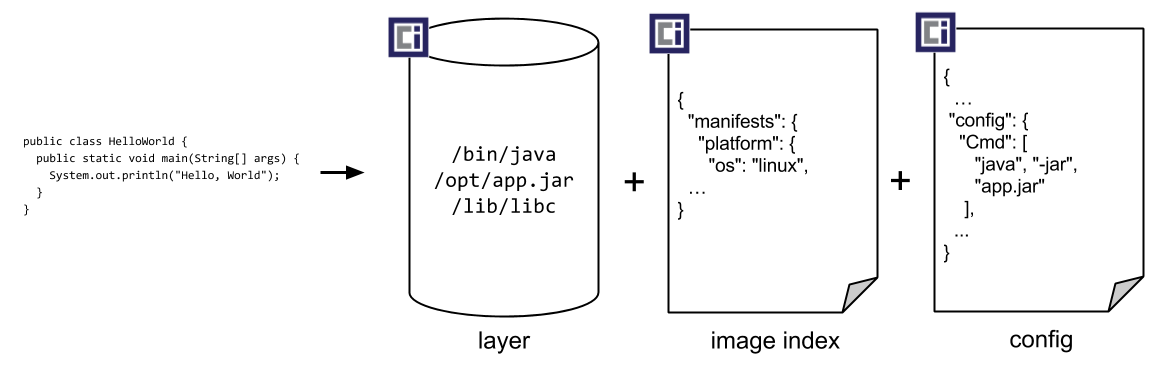
Imagine a container image as a complete package that contains everything your application needs to run—code, tools, libraries, and settings. It’s like a snapshot of the environment your app needs, making it super portable and easy to use on different systems.
Docker played a huge role in popularizing container images by providing a way to create, run, and share them. The format Docker uses for these images was even handed over to the Open Container Initiative to become a standard, known as the OCI image-spec.
Creating a Container Image:
Start with a Base: Your image begins with a base layer, often a lightweight version of an operating system, like Ubuntu.
Install Dependencies: Next, you add what your application needs to run, such as Python and any libraries.
Add Your Code: Copy your application code into the image.
Set the Working Directory: Define where your app will run within the container.
Specify the Startup Command: Decide what command starts your application.
Here’s a simple example of how to define this process using a Dockerfile for a Python app:
To build this into a container image with Docker, you'd use a command like docker build -t my-python-image -f Dockerfile. This builds the image and tags it, making it ready to run anywhere Docker is installed.
Sharing Your Container Image:
Once you’ve built your image, you can share it using a container registry, which is essentially a place to upload and download container images. Docker makes it easy to share images with commands like docker push to upload your image and docker pull to download it.
This way, developers can package their applications in a way that’s easy to run on any system that supports Docker, simplifying deployment and ensuring consistency across environments.
Last updated